Overview
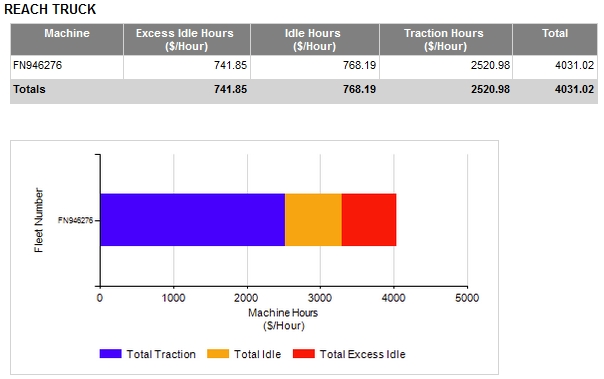
The Machine Metric Report provides a category-based report of machine activity divided into Excess Idle Hours, Idle Hours, Traction Hours and Total hours.
The report includes a colour coded bar graph for visual representation of the data.
This report can display the machine activity in hours or as an alternative value such as cost.
Configuration
The Machine Metric Report when run using default settings will use multipliers of 1.00 and units defined as Hours. To run the report to show other metrics, such as costs, you will need to configure your units and multipliers.
Configuration of the machine metric values is through the ADMINISTRATION menu on the ribbon bar.
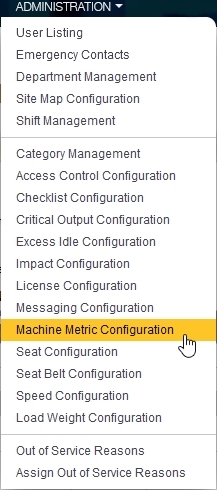
The configuration of the machine metric is category based. This means you will need to configure for each category you have active for your site. This allows you to adjust your multipliers for example to account for different running costs for different categories of machines.
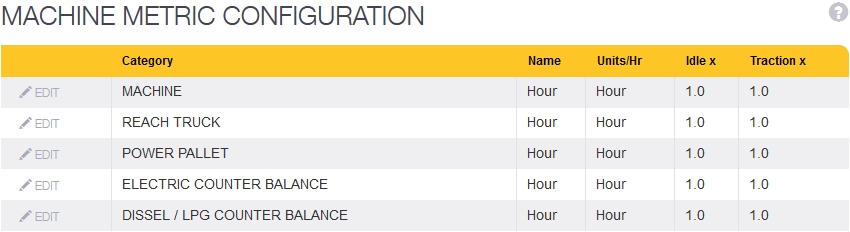
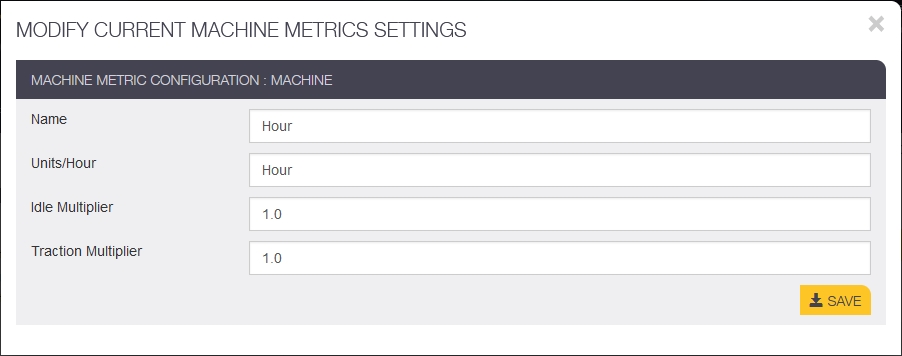
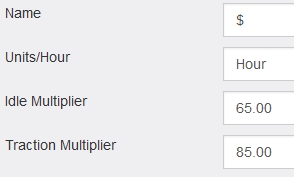
To set the values for the reporting, click on the EDIT icon . This will open to a screen where the multiplier values can be entered
The reporting will use the Name and Units/Hour fields configured here inside the report.
Example
An example would be a Reach Truck category where the cost of the truck at idle is $65 per hour, and the cost when in traction is $85 per hour.
The machine metric configuration would be configured to show Hour and the multiplier values set for Idle and traction. The name fields are configured so the report will display "$/Hour"
- The Idle multiplier is used to multiply the idle hours value to arrive at the metric defined by Name and Units/Hour.
- The Traction multiplier provides the same function as the idle multiplier and is applied to the traction hours only.
When the Machine Metric Report is run the values in the report use the defined names and multipliers. As a result, the report based on the example shows the costs of the machine for the reporting period instead of just the hours.