This guide is to set up the ability to turn on the critical output relay when a critical impact occurs
Applying critical output settings and Excess idle settings to machines categories
Note 1: if Critical Output Configuration cannot be seen please contact your local support branch.
Note 2: If the ADMINISTRATION menu cannot be seen please contact your local support branch.
Note 3: Unplanned Out Of Service reasons must be removed prior to enabling this option, else at the end of the guide do not enable OUT OF SERVICE on critical impact in step 12.
Note 4: This needs careful planning if also enabling excess idle shutdown. Please look for this separate guide if planning on enabling this feature. Both use the same output and may not be suitable to work in conjunction with each other.
- Go to ADMINISTRATION and select Critical Output
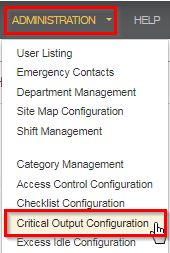
- The CRITICAL OUTPUT CONFIGURATION page will load

- Select EDIT next to the category with the machines you wish to add critical output to.
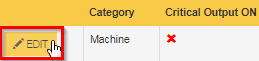
- MODIFY CURRENT CHECKLIST SETTINGS window will now appear
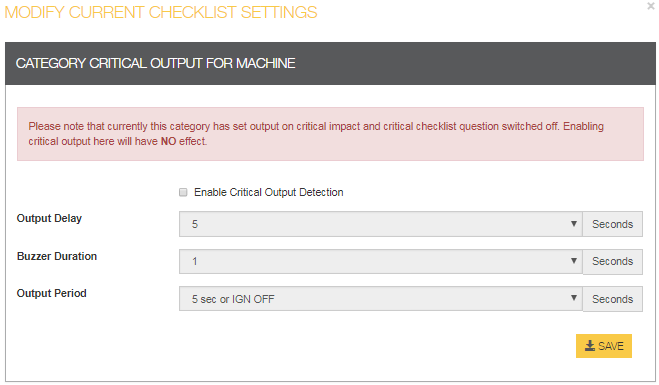
- Check the Enable Critical Output Detection tick box

- Set the output delay, Buzzer Duration and output Period Duration as desired.
- When you need to enter the 'Output Delay' it is suggested at minimum 10 seconds. This is the warning time before the machine shuts down. The ‘Buzzer Duration’ should be set to a minimum of 5 seconds. (note 4)
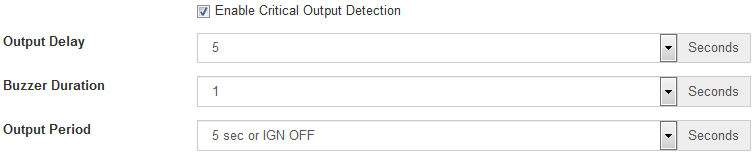
- Click on save

- Critical Output ON will now have a green tick

- Go to ADMINISTRATION and select Impact
- Select EDIT next to the category with the machines you wish to add the critical output to
- Modify the impact settings, enable CRITICAL OUTPUT on critical impact and enable OUT OF SERVICE on critical impact (see note 3)
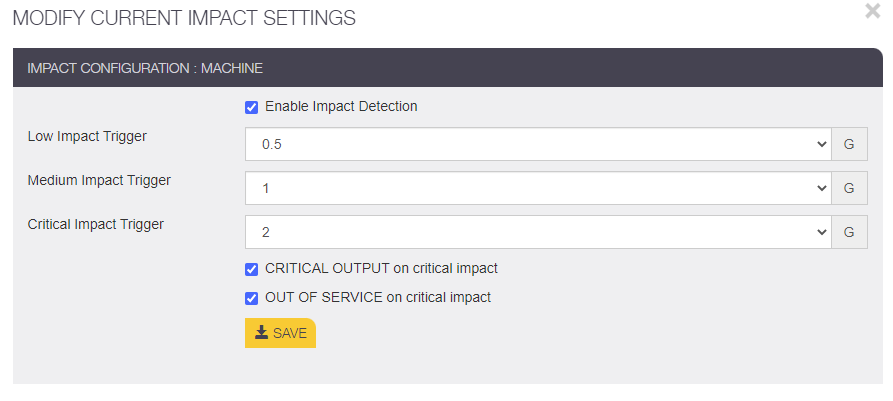
- Press save
- Machine will need to be power cycled to download the new settings.