This report allows users to drill down into machine data based on shifts and periods, presenting the results in pie charts and an exportable summary report.
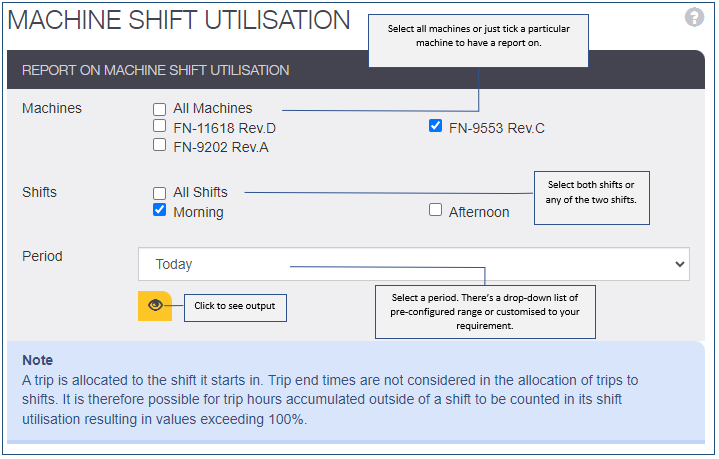
Shift Utilisation reports can be customised based on the following criteria:
Machine selection
- select one or all
Shift selection
- select one or all
If no shifts are available in Shift Management, the report will default to a 24-hour daily shift duration.
Period (Date range)
- Custom (user choses start / end dates)
- Last year
- Last six months
- Last three months
- Last calendar month
- Last seven days
- Last 24 hours
Each Shift Utilisation report page will display the following information:
- Date: 8/2/23 (report run date)
- Company: e.g., AlphaCompany
- Site: e.g., Perth Site
- Machines: e.g., Reporting on all three machine's or one machine selected, etc.
- Shifts: e.g., Monday 9 a.m./–5 p.m. (Note: Can select one or more or all shifts)
- Shift utilisation: e.g., 23%
- Shift working: e.g., 14%
- Total shift hours: e.g., 135 hours
- Date range: e.g., 1/2/23–8/2/23
Report use and data definition:
Users can customize their shift utilization report and click a button to view the data.
Clicking the view button will display a single pie chart.
The pie chart includes bar chart.
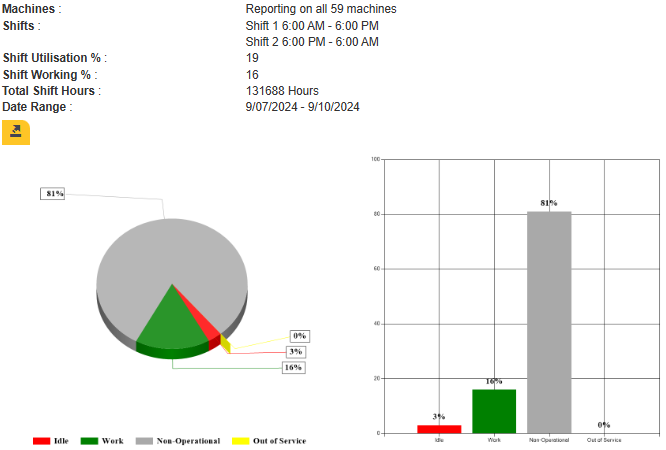
The download button will export a CSV summary of trips per operator for the machine.